How to Protect Your TikTok Privacy: A Complete Guide to Story & Account Settings
TikTok has grown into one of the most visited apps in the world, with over a billion people opening it every month to watch, post, and interact. But with that scale comes a real question a lot of users eventually ask: who can actually see what I post, and how much control do I really have over it?
This guide walks through every privacy layer TikTok offers — from your main account settings down to who can view your 24-hour Stories — so you can lock things down exactly the way you want, without guessing.
Why TikTok Privacy Settings Matter More Than People Realize
Most people install TikTok, skim the setup screen, and start posting. The default settings are reasonable for a public creator, but they’re not built with privacy as the priority — they’re built to maximize discovery and engagement. That’s fine if you’re trying to grow an audience. It’s a problem if you’re posting personal moments, testing content ideas, or simply don’t want strangers building a picture of your daily life from your activity.
A few common situations where privacy settings actually matter:
- You want friends and family to see your posts, but not coworkers, exes, or random strangers.
- You post Stories casually throughout the day and don’t want every view logged and visible to people you’d rather not know you’re watching.
- You’re a business or creator account and want to separate what’s public-facing from what’s personal.
- You’ve had unwanted followers, comments, or messages and want to reduce your exposure going forward.
Understanding exactly what each setting does — rather than just toggling things randomly — is the fastest way to fix this.
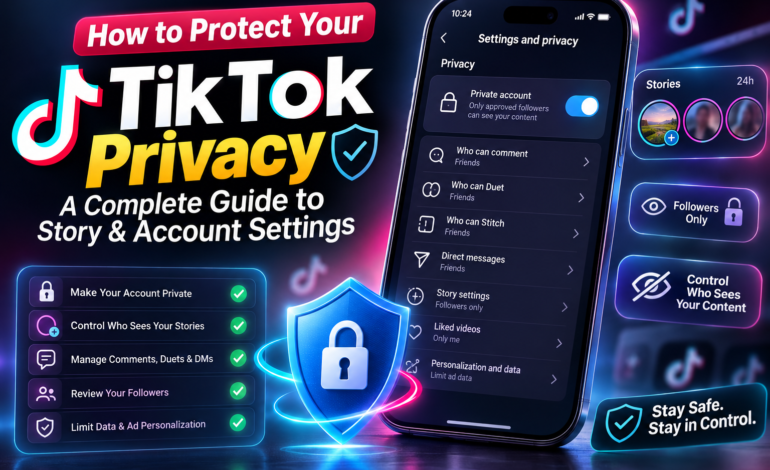
Making Your Account Private
The single biggest privacy lever on TikTok is switching from a public to a private account. This one setting controls almost everything downstream.
How to do it:
- Open TikTok and tap your Profile icon in the bottom right.
- Tap the three-line menu in the top right corner.
- Go to Settings and privacy.
- Tap Privacy.
- Toggle on Private account.
Once enabled:
- New followers must send a request that you approve before they can see your content.
- Only approved followers can view your videos, Stories, and liked content (if you’ve made likes visible).
- Your videos won’t appear in the “For You” feed to non-followers, and they can’t be duetted or stitched by people who don’t follow you.
Existing followers stay as they are when you switch to private — the change only affects future access, so review your follower list afterward if you want to remove anyone already on it.
Controlling Who Sees Your Stories Specifically
TikTok Stories work differently from your main video grid, and they have their own visibility rules worth understanding on their own.
- Stories are visible only to your followers (or, if your account is public, to anyone who can already see your regular posts).
- Every time someone views your Story, TikTok logs their username, and — depending on your settings — that person may appear in your viewer list.
- Stories disappear automatically after 24 hours, but downloads or screen recordings by other users can outlast that window, so treat Stories as semi-permanent, not truly temporary.
If you want tighter control over who sees your Stories specifically, keeping your account private is the most reliable method, since there’s no separate “Story-only” audience setting — Story visibility inherits from your overall account privacy.
Managing Who Can View Your Story-Viewer List
A lot of people don’t realize their own viewing activity is visible to others. If you watch someone’s Story, your username can show up in their list of viewers — the same way it works on Instagram or Snapchat.
If you’d rather not have your viewing habits visible to the people you’re watching:
- Consider whether you need to be logged into your main account for casual browsing, or whether a secondary, more anonymous account better fits how you use the app.
- Be aware that TikTok does not currently offer a native “ghost mode” or incognito viewing toggle for Stories the way some other platforms are experimenting with — so the only fully reliable way to avoid appearing in someone’s list is to not view their content while logged in.
This is worth knowing before you assume any browser tool or third-party service can make your viewing invisible without leaving a trace. In practice, official visibility only changes through official account settings.
The TikTok Rizz Party: How a Random Sweet 16 Video Became an Internet Sensation
Controlling Comments, Duets, Stitches, and Messages
Beyond the private/public toggle, TikTok gives you granular control over specific interactions. These are found in the same Settings and privacy > Privacy menu:
- Who can comment on your videos — Everyone, Friends, or No one.
- Who can Duet with your videos — Everyone, Friends, or No one.
- Who can Stitch with your videos — Everyone, Friends, or No one.
- Who can send you Direct Messages — Everyone, Friends, or No one.
- Who can see your liked videos — control whether your liked content is public.
Setting comments and DMs to “Friends” (mutual followers) rather than “Everyone” dramatically cuts down on unwanted contact without making your whole account private, if you’d rather keep public visibility for your content but limit direct interaction.
Reviewing and Removing Followers or Blocked Accounts
Privacy isn’t just about future settings — it’s also about auditing who currently has access.
To review your followers:
- Go to your Profile.
- Tap Followers.
- Review the list and remove anyone you don’t want to have access, using the three-dot menu next to their name.
To block someone entirely:
- Visit their profile.
- Tap the three-dot menu.
- Select Block.
Blocking prevents them from viewing your profile, videos, or Stories at all, and it also removes any following relationship in either direction.
Limiting Data TikTok Collects About You
Beyond who can see your content, there’s a second layer of privacy worth managing: what TikTok itself tracks and how it’s used for ad targeting.
- Go to Settings and privacy > Privacy > Personalization and data.
- Here you can limit data used for ad personalization and review what categories of information are being used to tailor your feed and ads.
You can also request a copy of the data TikTok holds on you, or request account deletion entirely, through Settings and privacy > Account > Download your data or Manage account.
Recognizing Red Flags From Third-Party “Viewer” Tools
Because TikTok Stories are time-limited and semi-private, an entire market of third-party websites and apps has sprung up claiming to let you view stories “anonymously,” bypass private accounts, or monitor someone else’s activity without their knowledge. It’s worth understanding why these claims deserve real skepticism:
- No tool can access a private account without authorization. If a service claims otherwise, that claim itself is the red flag — it usually means they’re either lying to get your money or attempting something that violates TikTok’s terms of service and, in many cases, the law.
- Tools that ask for your TikTok password directly are especially risky. Legitimate services never need your actual login credentials to show you public content.
- Anything installed on someone else’s device without their knowledge or consent to monitor their private messages or activity crosses from “privacy tool” into surveillance, which can carry serious legal consequences depending on your jurisdiction and relationship to that person.
- Read subscription terms carefully — many of these services rely on recurring charges and unclear cancellation policies as their actual business model, regardless of what the marketing promises.
The safest approach is almost always to work within TikTok’s own settings — both to protect your own privacy and to respect other people’s.
A Quick Privacy Checklist
If you want a fast pass through everything covered above, run through this list:
- Account set to Private (if that fits how you want to use TikTok)
- Comment permissions reviewed (Everyone / Friends / No one)
- Duet and Stitch permissions reviewed
- Direct message permissions reviewed
- Follower list audited and cleaned up
- Liked videos visibility checked
- Ad personalization and data settings reviewed
- Any accounts you don’t want contact with, blocked
Final Thoughts
TikTok’s privacy controls are more thorough than most people give them credit for — the challenge is that they’re spread across several menus instead of one central hub. Spending ten minutes working through the Settings and privacy > Privacy section will do more for your actual privacy than any third-party app claiming special access ever could.
The healthiest approach to social media privacy isn’t finding a workaround — it’s understanding and actively using the controls the platform already gives you, and extending the same respect to other people’s privacy that you’d want for your own.